Building AI-Native FinOps: From Chat Outputs to Actionable Interfaces
A work-in-progress update on building UI systems that transform AI-generated cost optimization recommendations into actionable workflows

I’ve been working on what I call “AI-Native FinOps” — exploring a fundamentally different approach to how users interact with AI-generated cost optimization recommendations. Here’s what I’ve learned and built so far.
The Problem: From AI Text to User Action
Traditional AI-powered FinOps tools follow a familiar pattern: generate comprehensive recommendations, dump them into a chat interface, and let users figure out what to do next. This creates a significant gap between AI output and user action.
Instead of reading “Our analysis suggests optimizing your EC2 instances could reduce costs by approximately 40–45% through rightsizing and reserved instance purchases,” users should see $919.33 estimated monthly savings, 42% cost reduction with immediate validation status and clear execution paths.
My working hypothesis: What if I can filter and transform AI outputs into intuitive UI components instead of presenting raw AI responses?
The Solution: Progressive Disclosure for AI Outputs
Instead of building another chat interface, I’m developing a UI system based on progressive disclosure: present essential information by default, with comprehensive details available on demand.
Traditional: AI Response → Chat → User Interpretation → Manual Action
My Approach: AI Response → Validation → UI Components → Guided Workflow
Early results are promising: users see $919.33 estimated monthly savings with 42% cost reduction instead of parsing lengthy AI text — transforming abstract recommendations into immediately actionable dashboard metrics.
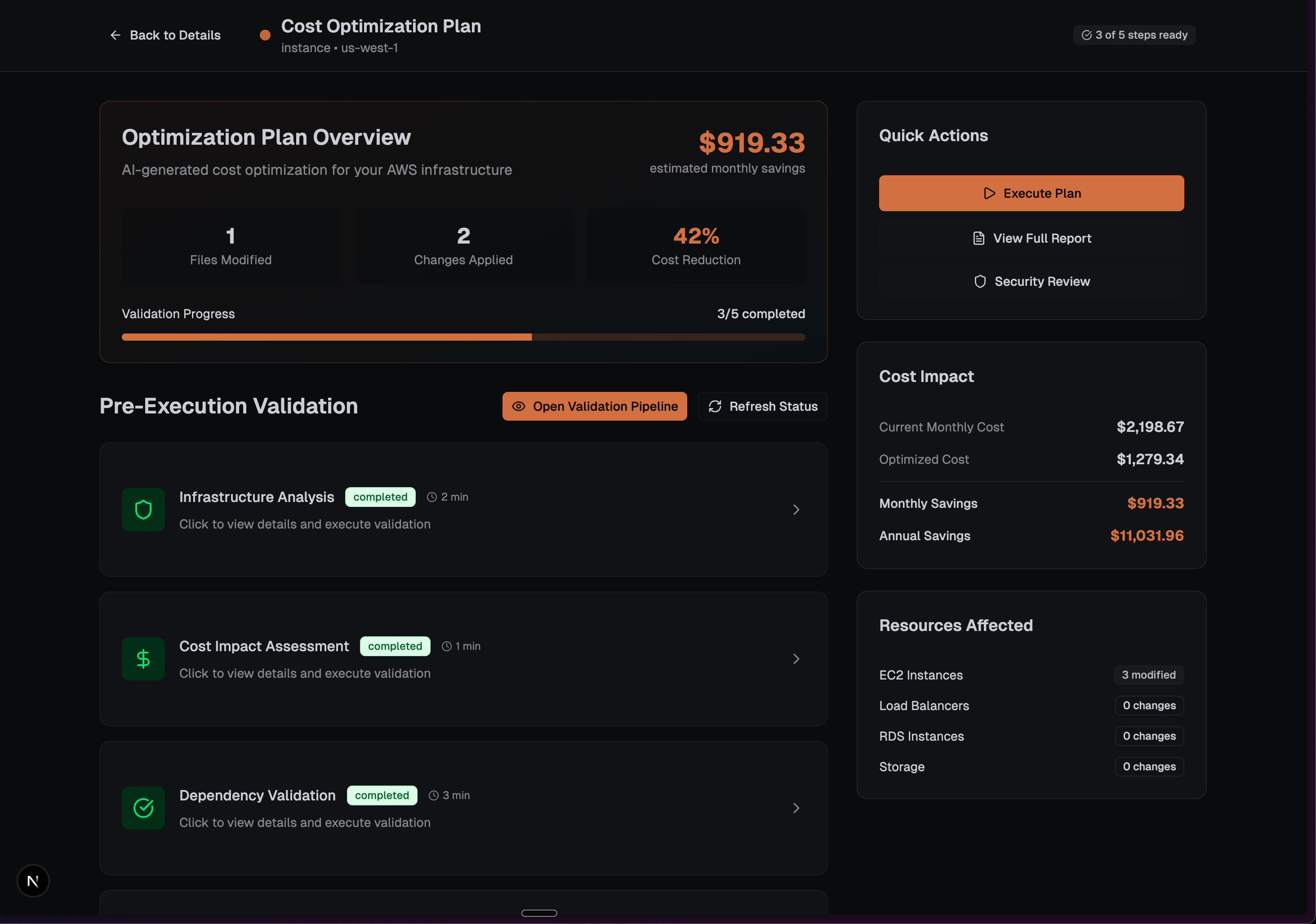
Pipeline Visualization: Making AI Workflows Visual
One thing I’ve been experimenting with is adapting GitHub Actions’ pipeline visualization for FinOps workflows, presenting cost optimization steps as an interconnected validation pipeline:
Visual state transitions from idle → running → validation → completion
Risk-aware color coding (orange for active, green for completed, muted for pending)
Real-time progress indicators showing validation steps with “3/5 completed” status
Snake-pattern flow layout optimizing screen real estate while maintaining logical sequence
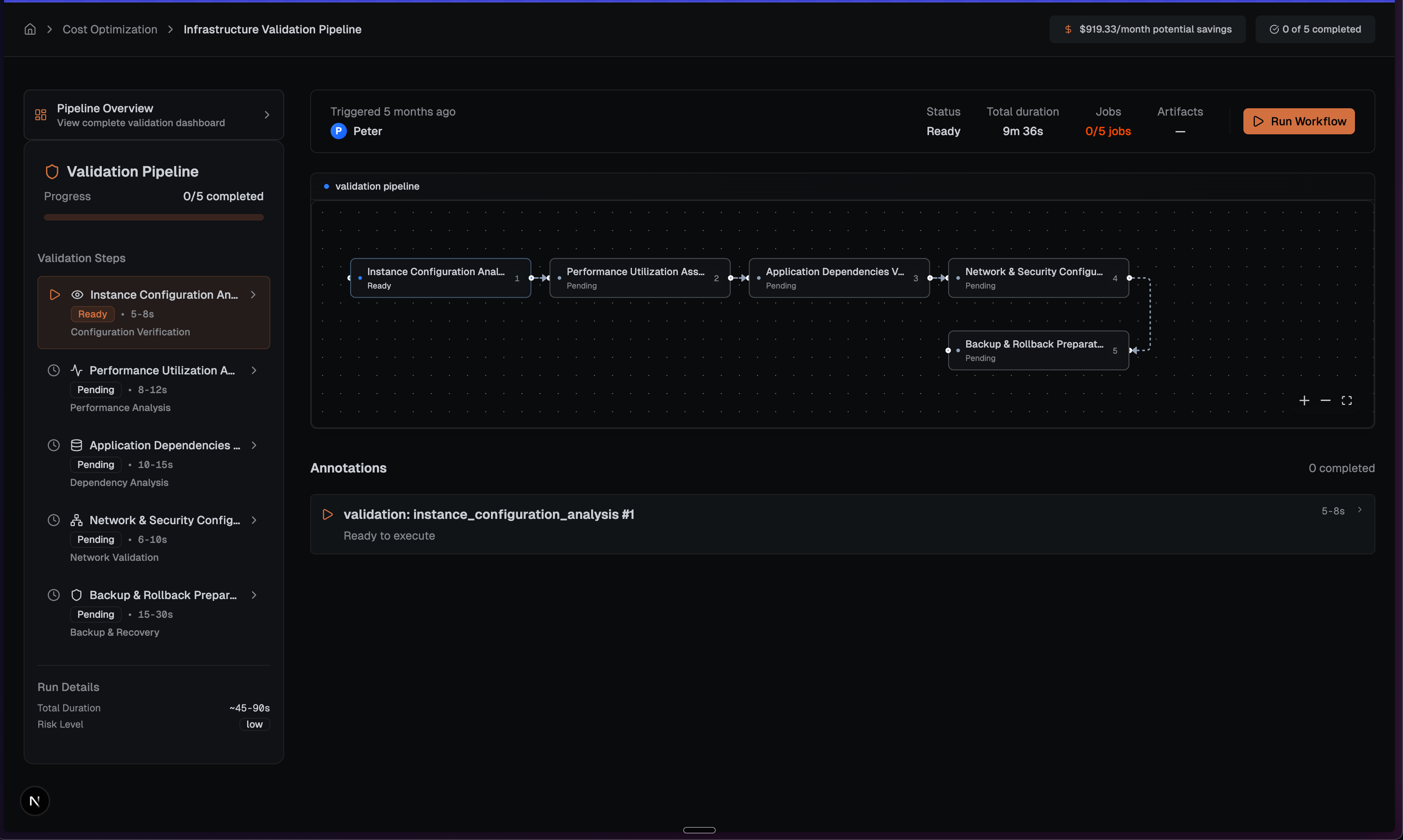
So far, this approach is transforming abstract AI recommendations into visually trackable workflows that users can understand at a glance, leveraging familiar CI/CD metaphors.
Smart Validation: From AI Output to Safe Execution
I’m building out automated validation for each cost optimization recommendation:
Compatibility Checks: Ensure changes won’t break existing infrastructure
Risk Assessment: Automated scoring displayed as “LOW”, “MEDIUM”, “HIGH” risk levels
Backup Management: Intelligent backup creation with rollback capabilities
Approval Workflows: Manual/automatic approval based on risk scores
Pre-execution Validation: Final AWS environment validation
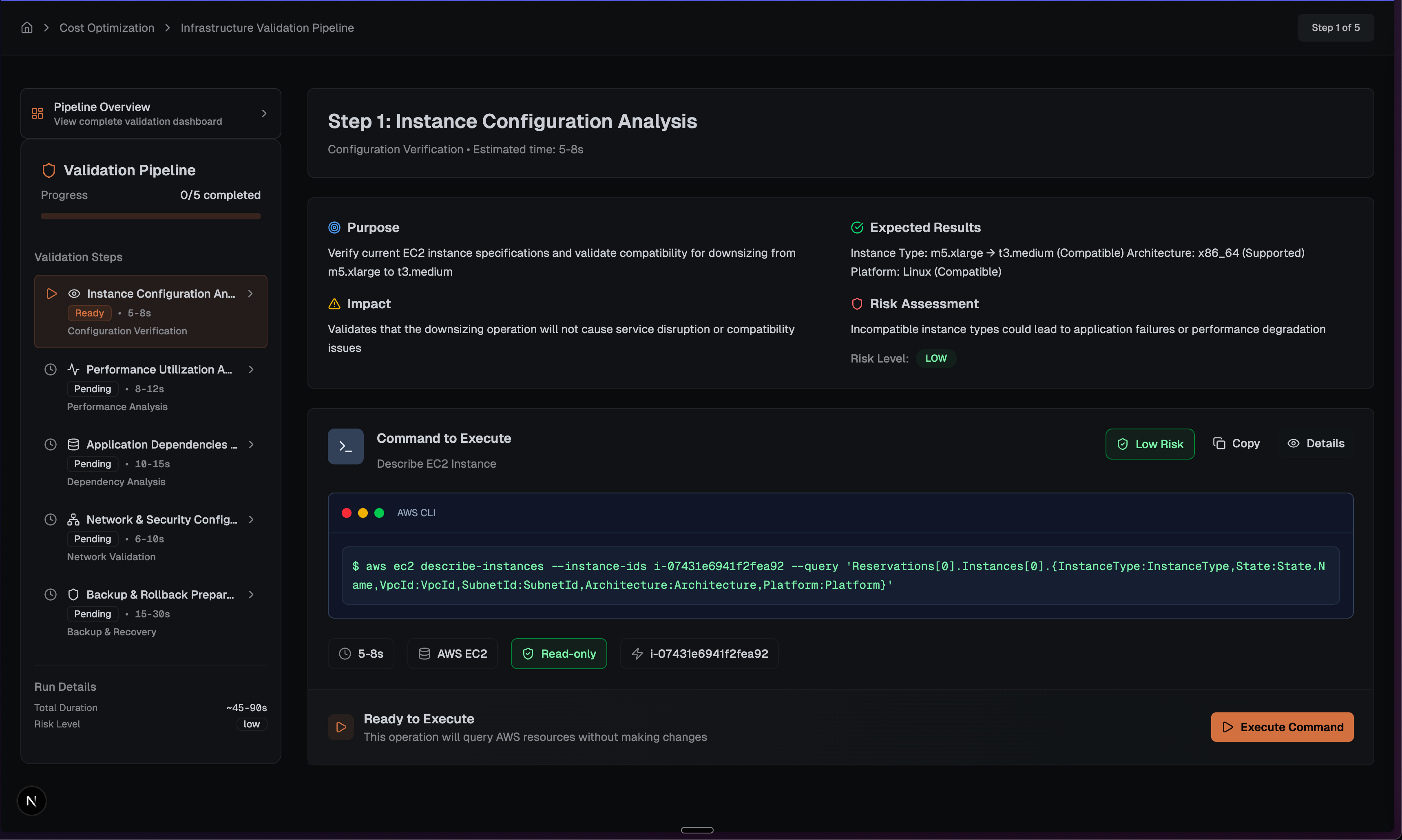
Each step displays Purpose, Impact, and Expected Results with syntax-highlighted AWS CLI commands. The “Ready to Execute” status provides immediate visual feedback, turning complex backend validation into user-friendly progress tracking.
Real-Time Transparency: Showing AI Progress
Since AI recommendations aren’t instant, I’m building streaming architecture that provides real-time progress updates without overwhelming the interface.
Interactive Terminal Integration
Rather than hiding command execution behind progress bars, I’m experimenting with giving users a real, interactive terminal showing exactly what’s happening:
Resizable terminal windows with full ANSI color support
Command history with session persistence across page refreshes
Real-time WebSocket integration with Ctrl+C support for interruption
Security-first validation with pattern-based command validation and AWS-specific allowlists
This approach gives power users transparency while maintaining production security boundaries — at least in theory. Still testing how this works in practice.
AI Command Versioning: Transparency in Automation
Something I’m particularly excited about is how I’m handling AI-generated command suggestions with complete transparency:
Side-by-side comparison between original and AI-generated versions (v1 vs v2)
AI rationale display explaining reasoning behind modifications
“AI Solution Ready” notifications with streamlined review workflows
Version control interface allowing users to select between human and AI command variants
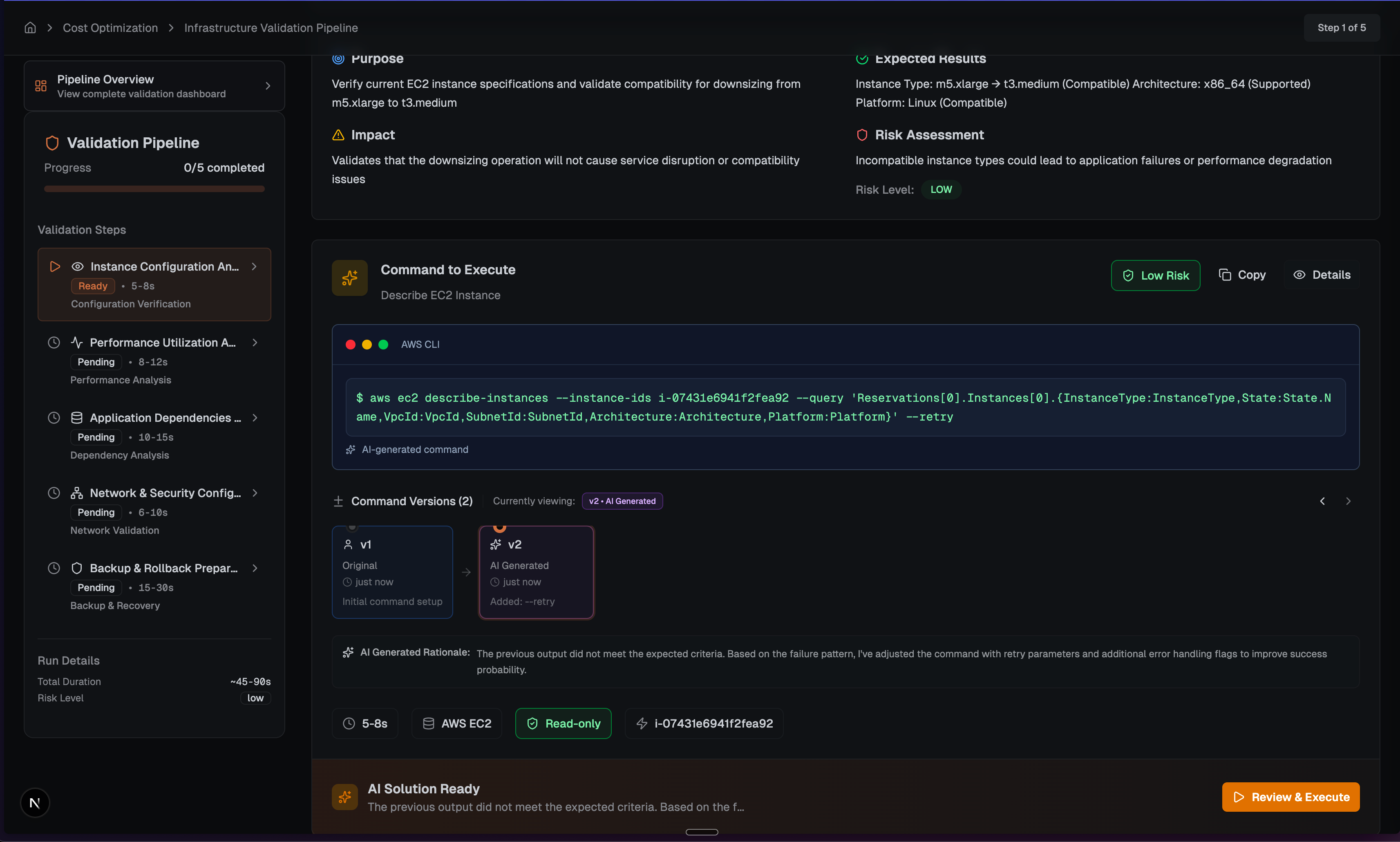
Smart Auto-Execution
I’m also working on auto-run capabilities with safety controls for low-risk optimizations:
const autoRun = {
  enabled: riskScore < 0.3,
  countdown: calculateCountdown(riskScore),
  cancellable: true,
  requiresApproval: riskScore > 0.7
}
The idea is that users can let safe optimizations run automatically while maintaining oversight of higher-risk changes through clear “LOW/MEDIUM/HIGH” risk indicators. This is still very much a work in progress.
Current Progress: From AI Text to User Action
User Experience Changes So Far
Cognitive Load Reduction: Users see concrete metrics ($919.33 savings, 42% reduction) instead of parsing AI text
Visual Workflows: Clear progression from dashboard → pipeline → execution using familiar CI/CD metaphors
Risk-Aware Execution: Automated assessment with LOW/MEDIUM/HIGH indicators and appropriate approval gates
AI Transparency: Command versioning (v1 vs v2) with explicit rationale and user control
Real-Time Feedback: Live terminal output with streaming progress updates
Technical Progress
150+ commits across three repositories so far
Streaming infrastructure with comprehensive security validation (ongoing)
React 18 + TypeScript foundation with testing framework in place
What I’m Learning: Building AI-Native Interfaces
1. Filter AI Outputs, Don’t Just Display Them
I’m discovering that the breakthrough isn’t generating more AI content — it’s intelligently filtering and presenting AI outputs in formats that match user decision-making processes. Transform “cost reduction analysis” into “$919.33 monthly savings” with immediate next steps.
2. Progressive Disclosure Scales Complexity
FinOps decisions involve complex tradeoffs. Progressive disclosure lets users operate at their preferred detail level while maintaining access to comprehensive information when needed.
3. Familiar Visual Metaphors Reduce Cognitive Load
Adapting GitHub Actions pipeline visualization for FinOps workflows is making complex AI processes more intuitive — users already understand CI/CD patterns and can transfer that knowledge to cost optimization flows.
4. Transparency Builds Trust in AI Recommendations
Command versioning (v1 vs v2) with explicit AI rationale is letting users see exactly what changed and why, making AI assistance feel more controllable rather than mysterious.
Interface Patterns I’m Developing
My current prototype is exploring three core UI principles:
1. Dashboard-First Information Architecture
Transform dense AI analysis into scannable metrics: $919.33 monthly savings, 42% cost reduction with clear validation status (3/5 completed) and immediate next steps.
2. Pipeline Visualization Using Familiar Metaphors
Connected node visualization adapted from GitHub Actions is making complex AI workflows more intuitive, with real-time progress updates and clear state transitions.
3. Command Transparency Through Versioning
Side-by-side comparison between original and AI-generated commands (v1 vs v2) with explicit rationale, making AI assistance feel more controllable rather than mysterious.
Where This Is Heading
This work is starting to demonstrate that the future of AI-powered tools might not be about more sophisticated AI outputs — it could be about more sophisticated ways of presenting AI outputs to humans.
The principles I’m developing seem to apply beyond FinOps:
Information filtering over generation
Progressive disclosure for complex workflows
Familiar visual metaphors for new AI processes
Transparency through versioning and rationale
By focusing on information architecture and user experience, I’m building toward a system that truly augments human decision-making rather than overwhelming it. The current prototype shows promise for presenting sophisticated AI through intuitive interfaces that respect cognitive load while maintaining access to comprehensive detail when needed.
This is still very much a work in progress, and I’m learning as I build. More updates to come as the system evolves.
Tags: AI-UX, FinOps, Progressive Disclosure, Information Architecture, UI Design